Text Alerts
Whatzon can text you when a show you follow gets a return date. It is off unless you turn it on, it needs a code sent to your phone before it sends anything else, and you can stop it from the app or by replying STOP.
What this is
Program name: Whatzon Return Alerts.
Sender: Whatzon (whatzon.show), a
television return-date tracker run from Rochester, New York.
Sending number: +1 (888) 693-1692 — toll-free, one number, all
messages. This is the number every message below arrives from, and the one to check a
suspicious text against.
Who receives messages: only people with a Whatzon account who have added
their own mobile number and confirmed it with a one-time code. Numbers are never bought,
imported, or added by anyone other than the account holder.
How you opt in
Method: web sign-up (Twilio “via website”), with a one-time code sent to the handset. No number is ever stored, and no marketing message is ever sent, until the code proves the person holds the phone.
- Sign in at whatzon.show and open Account → Text Alerts. Text alerts are off by default and are never a condition of using Whatzon.
- Read the consent sentence quoted below and type your own mobile number.
- Press Send Me A Code. We text a 6-digit code — the only message sent before consent is confirmed.
- Request for final confirmation: enter that code and press Confirm Number. This is the affirmative act. A number that never completes this step is discarded and receives nothing further.
- We reply with the confirmation message below, and the subscription begins.
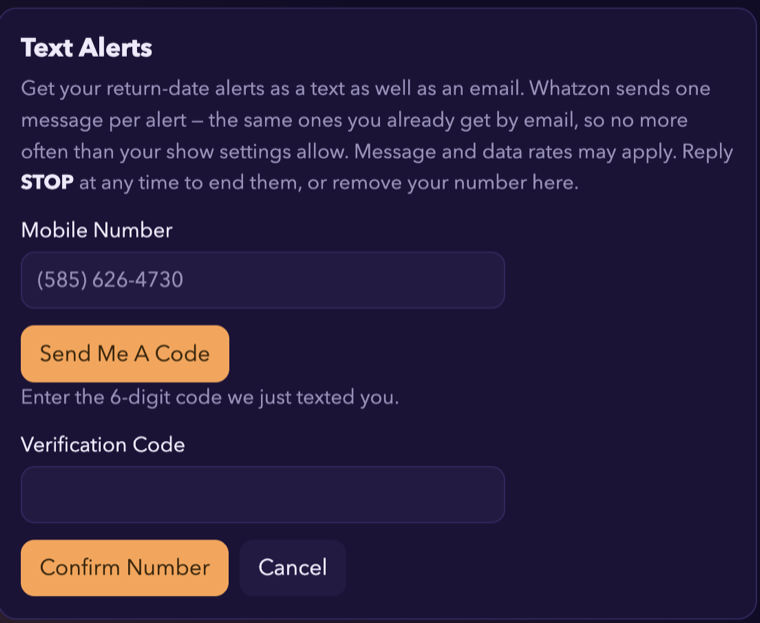
This is the consent you agree to on that screen, word for word:
Get your return-date alerts as a text as well as an email. Whatzon sends one message per alert — the same ones you already get by email, so no more often than your show settings allow. Message and data rates may apply. Reply STOP at any time to end them, or remove your number here.
There is no pre-checked box and no bundled consent: agreeing to the terms of use does not opt you into texts, and an account with no number set never receives one.
The opt-in screen
Campaign collateral, captured from the live application — both steps of the flow above, with the consent language as the user reads it. Direct image: whatzon.show/sms-optin-screen.png

The messages
1. Verification code — the only message sent before consent is confirmed. No STOP on this one: there is nothing yet to opt out of, and a reply would be recorded against a number that has not confirmed itself.
Whatzon: 123456 is your verification code. It expires shortly and can be used once. If you did not ask for this, ignore this message.
2. Confirmation message — sent once, the moment the code is accepted.
Whatzon Return Alerts: you are subscribed. We text when a show you follow gets a return date - a few messages a month. Msg & data rates may apply. Reply HELP for help, STOP to cancel.
3. Alert — the only recurring message, and the only reason this programme exists. Sent when a show the subscriber chose to follow gets a return date, that date moves, or the series ends.
Whatzon: Severance is back on 17 Jan. Reply STOP to end texts.
No marketing, no promotions, no third-party content, and nothing about shows the subscriber has not added themselves.
How often
Only when something changes on a show you follow — a return date is announced, a date moves, or a series ends — plus the countdown you set yourself per show. Most people get a few messages a month. A run that finds no changes sends nothing at all, and Whatzon sends at most one message per account per run.
Cost
Whatzon is free. Message and data rates may apply — that is between you and your mobile carrier, and Whatzon has no part in it.
Keywords
STOP — ends all messages. Also accepted: END, CANCEL, UNSUBSCRIBE,
QUIT.
HELP — returns contact details and a pointer to this page.
Both are handled on +1 (888) 693-1692 by Twilio’s default opt-out management, so
they work on every message whether or not the app is reachable.
There is no join keyword. Subscription is by the web flow above only, on an account that has signed in — a number cannot be enrolled by texting this programme, which is why it cannot be enrolled by anybody except its owner.
How to stop
Reply STOP to any message and the texts end. You can also remove your number at Account → Text Alerts → Stop Texts & Remove Number, which deletes the number and the consent record together. Stopping texts does not close your account or stop your email alerts.
Help
Reply HELP to any message, or mail support@whatzon.show and a person will read it. See also Contact.
Carriers
Carriers are not liable for delayed or undelivered messages.
Your number
Your mobile number is used to send these alerts and for nothing else. It is never sold, never shared with advertisers, and not passed to anyone except the messaging provider that delivers the text. It is deleted when you remove it or close your account. The full detail is in the privacy policy; the terms of use cover the rest.